Activating the Integration
Overview of the coordination process required to establish the connection between RoomBoss and Rakuten Travel.
Requesting the Connection
If you would like to connect your property to Rakuten Travel, please email the RoomBoss Support Team with the following information:
- Facility name
- Rakuten Facility ID
- Desired connection start date (Available days: Monday to Thursday (weekdays))
- RoomBoss room type(s) to be connected
- RoomBoss rate plan(s) to be connected
If you are connecting multiple properties, you may include all properties in a single email.
- If another channel manager is currently connected, the connection cannot proceed until disconnection or cancellation is completed on that side.
- If the R-Connect application has not yet been submitted, Rakuten will tentatively note the desired connection date and may request follow-up to ensure the application is completed before the switch date.
R-connect Application
Please submit your application via the 'R-Connect Application' menu, located on the top left of the Rakuten Travel console page.
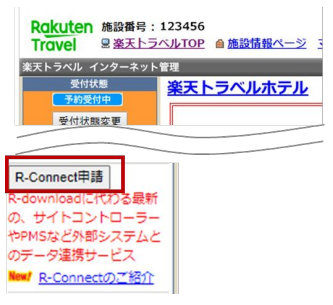
Due date: You will need to submit your application at least three business days before the date you intend to connect your site controller with Rakuten Travel.
Please review the terms and conditions, and then enter the required information.
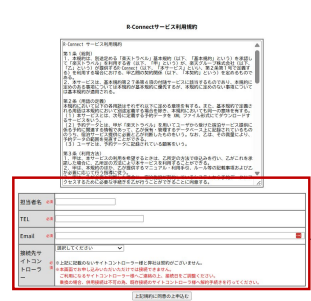
- Contact Person's Name
- Phone number
- Channel manager to connect
Confirmation and Connection Execution
RoomBoss will contact Rakuten Travel to confirm whether the listed properties are ready to be connected.
If no additional action is required from you, Rakuten Travel and RoomBoss will proceed with the connection on the requested start date. You will be notified once the connection has been completed.
For connection coordination and any post-connection issues, please contact:
trv-syssale@mail.rakuten.com
(Rakuten Travel Platform connection group)