Other Notes
Important behavioral details, limitations, and considerations for pricing, bookings, and payments.
Configuration Requirements
Pricing Model Setting
When connecting RoomBoss with Rakuten Travel, the Room Type Setting must be configured correctly. In the Rakuten console, the pricing model for the Room Type must be set to: Per Person Pricing (1人あたり料金設定)
Please ensure the following setting is applied:

RoomBoss sends occupancy-based pricing, and Rakuten requires the Room Type to be configured as Per Person Pricing or it will not accept the rates from RoomBoss.
Please also review the limitations of Occupancy Based Pricing.
Room Type Sellability Period
In the Rakuten console, each room type includes a Sellability Period (Sales Period). This period determines when a room type is available for booking within Rakuten. Rakuten currently allows the sales period to be set only until December of the following year.
Please configure the Sellability Period from the current date until the furthest possible date allowed by Rakuten.
Availability and actual bookable dates will still depend on:
- Rates configured in RoomBoss
- Availability sent from RoomBoss
Therefore, extending the sellability period does not automatically open inventory beyond what RoomBoss provides.
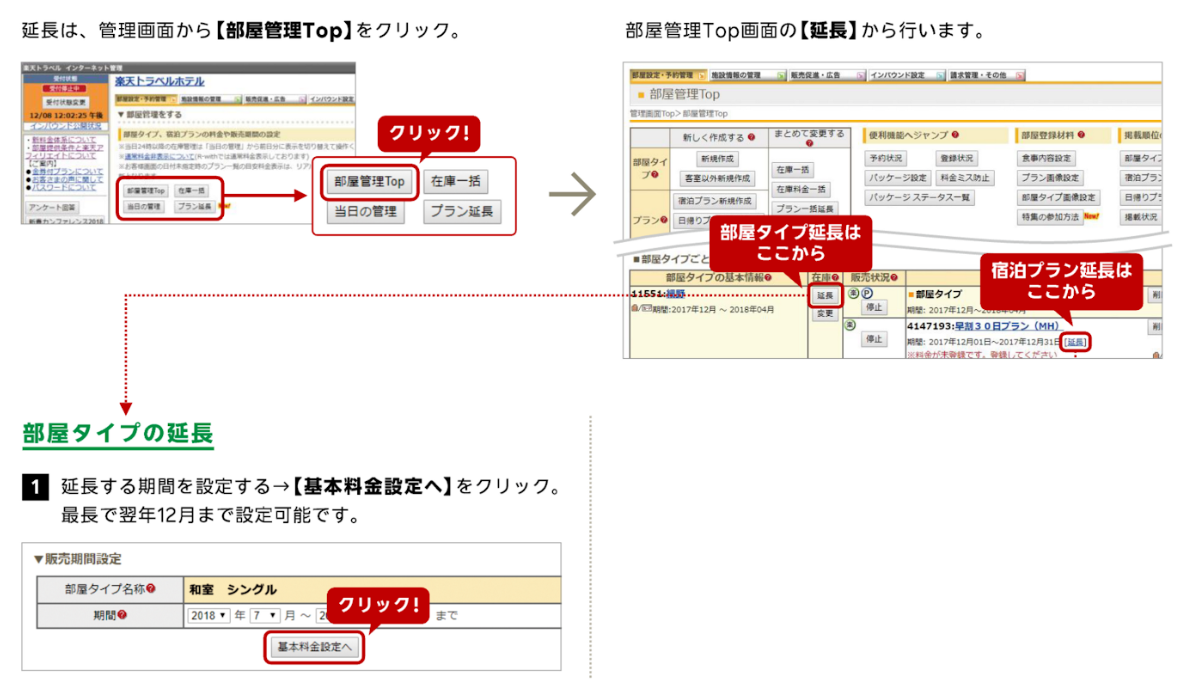
- Click 部屋管理Top (Room Management Top)
- Click 延長 (Extend)
- Set the period
- Click 基本料金設定へ (Base Rate Settings)
Reservations
Child Category Handling in Rakuten
The RoomBoss setting "Maximum age for a guest to be counted as an infant" does not apply to Rakuten bookings.
Rakuten applies its own child category structure to bookings. Please refer to the table below for details on which categories are supported by RoomBoss.
| # | Japanese | English | Supported in RoomBoss |
|---|---|---|---|
| 1 | 幼児(食事・布団なし) | Infant (no meal, no bedding) | Yes |
| 2 | 幼児(布団のみ) | Infant (bedding only) | No |
| 3 | 幼児(食事のみ) | Infant (meal only) | No |
| 4 | 幼児(食事・布団つき) | Infant (meal and bedding included) | No |
| 5 | 小学校低学年 | Elementary school (lower grades) | Yes |
| 6 | 小学校高学年 | Elementary school (upper grades) | Yes |
Rakuten Coupons
- Rakuten coupons are displayed in the Message from Customer section.
- Gross and sell prices are not automatically deducted by coupon values.
- Multiple coupon value types exist in the Rakuten system.
Coupon Types
| JA Name | Notes |
|---|---|
| ショップクーポン | Facility-funded coupon |
| サービスクーポン | Rakuten or government funded coupon |
Payment Methods and Booking Segments
| JA Name | EN Name | RoomBoss Booking Segment | Notes |
|---|---|---|---|
| 現地払い | Pay on site | Rakuten Pay at Hotel | |
| 事後カード決済 | Pay with credit card later | Rakuten Prepaid | |
| 事前カード決済 | Pay with credit card in advance | Rakuten Prepaid | |
| 法人払い | B2B payment | Rakuten B2B (Racco/BTM) | |
| ダイナミックパッケージ | Dynamic package | Rakuten Prepaid | |
| 提携先決済 | Partner payment | Rakuten Partner Settlement | Room charge is settled via partner; local taxes and similar public charges must be collected onsite by the hotel. |
No-Show Handling for Onsite Payment
-
Inbound bookings (global platform)
Even for onsite payment bookings, a credit card is required on file. In case of a no-show, the hotel charges the stored card in accordance with Rakuten policy. -
Domestic bookings (Japan local)
For onsite payment no-shows, the hotel contacts the guest directly to collect payment. Rakuten does not intermediate the collection.
Rate Plans
Restriction Limitations
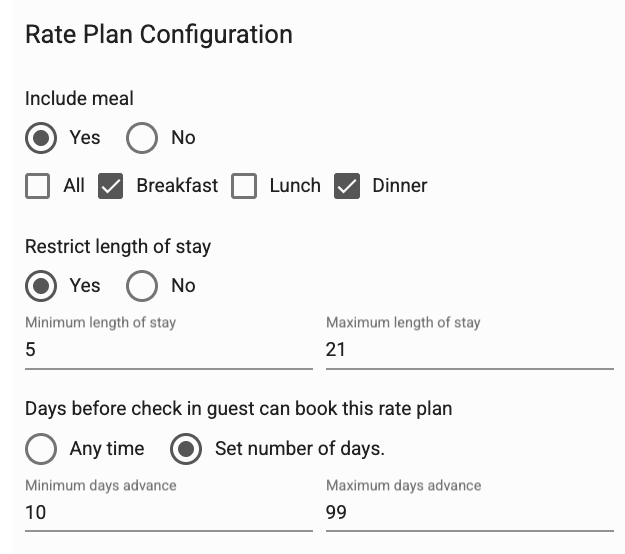
Rakuten supports restrictions only at the rate plan level.
This means restrictions configured per date or per rate entry cannot be transmitted from RoomBoss to Rakuten.
Examples of restrictions affected by this limitation include:
- Minimum Length of Stay (Min LOS)
- Maximum Length of Stay (Max LOS)
- Minimum Days Advance
- Maximum Days Advance
These restrictions should be configured within the Rate Plan configuration in RoomBoss.
- Per-day restrictions are not supported.
- Per-period restrictions are not supported.
- Closed to Arrival (CTA) restriction is not supported.
- Closed to Departure (CTD) restriction is not supported.
Where to Configure Restrictions in RoomBoss
Restrictions should be set on the Rate Plan page.
Setting restrictions on the Rates page (per-day rate entries) will not be supported by Rakuten and will not sync correctly.
For best results, configure all restrictions within the Rate Plan configuration section.
Important Note on Rakuten-side Changes
If restrictions or configuration values are manually modified directly within the Rakuten console, they may be overwritten by future updates sent from RoomBoss.
For this reason, it is recommended that all restriction settings be managed within RoomBoss rather than the Rakuten portal.
Occupancy-Based Pricing
- Occupancy-based pricing configured in RoomBoss may display differently in Rakuten.
- Rakuten's maximum per-person pricing calculation is limited to 5 people.
- For bookings exceeding 5 guests, Rakuten uses the 5-person per-person rate multiplied by the actual number of guests.
Example
RoomBoss base price for 1 guest = ¥45,000 (1 x ¥45,000)
Rakuten per person = ¥45,000
Rakuten Total = ¥45,000 (1 x ¥45,000)
RoomBoss base price for 2 guests = ¥45,000 (2 x ¥22,500)
Rakuten per person = ¥22,500
Rakuten Total = ¥45,000 (2 x ¥22,500)
RoomBoss base price for 3 guests = ¥45,000 (3 x ¥15,000)
Rakuten per person = ¥15,000
Rakuten Total = ¥45,000 (3 x ¥15,000)
RoomBoss price for 4 guests = ¥55,000 (4 x ¥13,750)
Rakuten per person = ¥13,750
Rakuten Total = ¥55,000 (4 x ¥13,750)
RoomBoss price for 5 guests = ¥65,000 (5 x ¥13,000)
Rakuten per person = ¥13,000
Rakuten Total = ¥65,000 (5 x ¥13,000)
RoomBoss price for 6 guests = ¥72,000 (6 x ¥12,000)
Rakuten per person = ¥13,000 (5-pax rate)
Rakuten Total = ¥78,000 (6 x ¥13,000)
RakutenSuperPointRate
This is a member loyalty rebate paid for by the property. Rakuten Travel requires properties to offer at least 1 percent in points for each booking.
RoomBoss automatically sends a RakutenSuperPointRate value of 1, ensuring guests receive the minimum 1 percent point rebate on their reservations.